Function Description
Color screen IP phones support custom upgrade for idle screen wallpaper and title logo. H5 series phones additionally support custom upgrade for shortcut key icons. Two upgrade methods are available: Web UI upgrade and Auto Provision upgrade. Supported image formats: .bmp and .tar.gz.
Image Specifications
1. Wallpaper specifications for different color screen phone models:
Table 1 - Color Screen Series Wallpaper Specifications
| Model | Resolution
W*H | Color Depth | Format | File Size | File Name |
| BX3S/BX4 | 320*240 | 16bit
RGB565 | bmp | ~150KB | Unlimited |
| BX3SG | 320*240 | 16bit
RGB565 | bmp | ~150KB | Unlimited |
| BX3U | 320*240 | 16bit
RGB565 | bmp | ~150KB | Unlimited |
| BX4U | 320*240 | 16bit
RGB565 | bmp | ~150KB | Unlimited |
| BH5 | 480*320 | 16bit
RGB565 | bmp | ~300KB | Unlimited |
| BX5S | 480*320 | 16bit /24bit
RGB565 | bmp | ~300KB | Unlimited |
| BX5U | 480*320 | 16bit
RGB565 | bmp | ~300KB | Unlimited |
| BX6-Main | 480*272 | 24bit
RGB888 | bmp | ~380KB | Unlimited |
| BX6-Sub | 240*320 | 16bit
RGB565 | bmp | ~150KB | Unlimited |
| BX6U | 480 * 272 | 24bit
RGB888 | bmp | ~380KB | Unlimited |
| BX7 | 800*480 | 24bit
RGB888 | bmp | ~1.00MB | Unlimited |
| BX7C | 800*480 | 24bit
RGB888 | bmp | ~1.00MB | Unlimited |
| GP210/GP210i-Main | 480*272 | 24bit
RGB888 | bmp | ~380KB | Unlimited |
| GP210/GP210i-Sub | 320*480 | 16bit
RGB565 | bmp | ~300KB | Unlimited |
2. DSS key icon specifications for different color screen phone models:
Table 2 - DSS Key Icon Specifications for Color Screen Models
| Model | Resolution
W*H | Color Depth | Format | File Size | File Name |
| BX3S/BX4 | - | - | - | - | - |
| BH5 | 54*54 | 16bit
RGB565 | bmp | ~5KB | See Table 3 |
| BX4U-Side | 25*25 | 32bit | Png | ~3KB | See Table 4 Normal DSSkey |
| BX4U-Sub | 42*42 | 32bit | Png | ~3KB | See Table 4 Normal DSSkey |
| BX5U-Side | 25*25 | 32bit | Png | ~3KB | See Table 4 Normal DSSkey |
| BX5U-Sub | 42*42 | 32bit | Png | ~3KB | See Table 4 Normal DSSkey |
| BX6U-Side | 25*25 | 32bit | Png | ~3KB | See Table 4 Normal DSSkey |
| BX6U-Sub | 42*42 | 32bit | Png | ~3KB | See Table 4 Normal DSSkey |
| BX5S | - | - | - | - | - |
| BX6-Sub DSS | 42*42 | 32bit | Png | ~3KB | See Table 4 Normal DSSkey |
| BX7 | - | - | - | - | - |
| BX7C | 31*31 | 32bit | Png | ~4KB | See Table 4 Side DSSkey |
| GP210/GP210i-Side | 25*25 | 32bit | Png | ~2KB | See Table 4 Side DSSkey |
| GP210/GP210i-Sub DSS | 42*42 | 32bit | Png | ~3KB | See Table 4 Normal DSSkey |
3. Idle screen speed dial icon naming for BH5 phones:
Table 3 - H5 Phone Custom Icon Naming
| File Type | File Name | Format | File Size | Resolution WxH |
| Reception | ICON_RECEPTION | bmp | ~5KB | 54x54 |
| Service | ICON_SERVICE | bmp | ~5KB | 54x54 |
| Cleaning | ICON_CLEANING | bmp | ~5KB | 54x54 |
| Wakeup | ICON_WAKEUP | bmp | ~5KB | 54x54 |
| Emergency | ICON_EMG | bmp | ~5KB | 54x54 |
| Manager | ICON_MANAGER | bmp | ~5KB | 54x54 |
Note: The background color of shortcut key images must be black to remove the background and display circular icons on the LCD screen.
4. Idle screen DSS key icon naming for color screen phones:
Table 4 - DSS & Side DSS Key Icons
| DSSkey Type | Side DSSkey Icon Name | Normal DSSkey Icon Name |
| BLF List | side_custom_dss_blflist.png | custom_dss_blflist.png |
| DTMF | side_custom_dss_dtmf.png | custom_dss_dtmf.png |
| None | side_custom_dss_edit.png | custom_dss_edit.png |
| Key event | side_custom_dss_keyevent.png | custom_dss_keyevent.png |
| Line | side_custom_dss_line.png | custom_dss_line.png |
| URL&Action URL | side_custom_dss_url.png | custom_dss_url.png |
| Mcast | side_custom_dss_mcast.png | custom_dss_mcast.png |
| Memory Key/Attend Transfer | side_custom_dss_mem_axfer.png | custom_dss_mem_axfer.png |
| Memory Key/Blind Transfer | side_custom_dss_mem_bxfer.png | custom_dss_mem_bxfer.png |
| MemoryKey/Call park | side_custom_dss_mem_callpark.png | custom_dss_mem_callpark.png |
| Memory Key/Call Forward | side_custom_dss_mem_cfw.png | custom_dss_mem_cfw.png |
| Memory Key/Conference | side_custom_dss_mem_conf.png | custom_dss_mem_conf.png |
| Memory Key/DTMF | side_custom_dss_mem_dtmf.png | custom_dss_mem_dtmf.png |
| Memory Key/Intercom | side_custom_dss_mem_intercome.png | custom_dss_mem_intercome.png |
| Memory Key/MWI | side_custom_dss_mem_mwi.png | custom_dss_mem_mwi.png |
| Memory Key/New Call | side_custom_dss_mem_newcall.png | custom_dss_mem_newcall.png |
| Memory Key/Present | side_custom_dss_mem_present.png | custom_dss_mem_present.png |
| Memory Key/Speed Dial | side_custom_dss_mem_spdial.png | custom_dss_mem_spdial.png |
Title logo specifications for color screen phones:
Note: X5S & X6 series do NOT support custom title logo upgrade temporarily.
| Model | Resolution WxH | Color Depth | Format | File Size | File Name |
| X3S/X4/H5/D5 | W ≤ Screen Width; H < titlebarH | 16bit RGB565 | bmp | ~10KB | TITLE_LOGO |
Title bar height (titlebarH):
A: H5 = 40px
B: BX3S/BX4/D5 = 35px
Image Creation Method
Tool
Adobe Photoshop
Creation Steps
2.1 Open Photoshop → Open your image → Image → Image Size
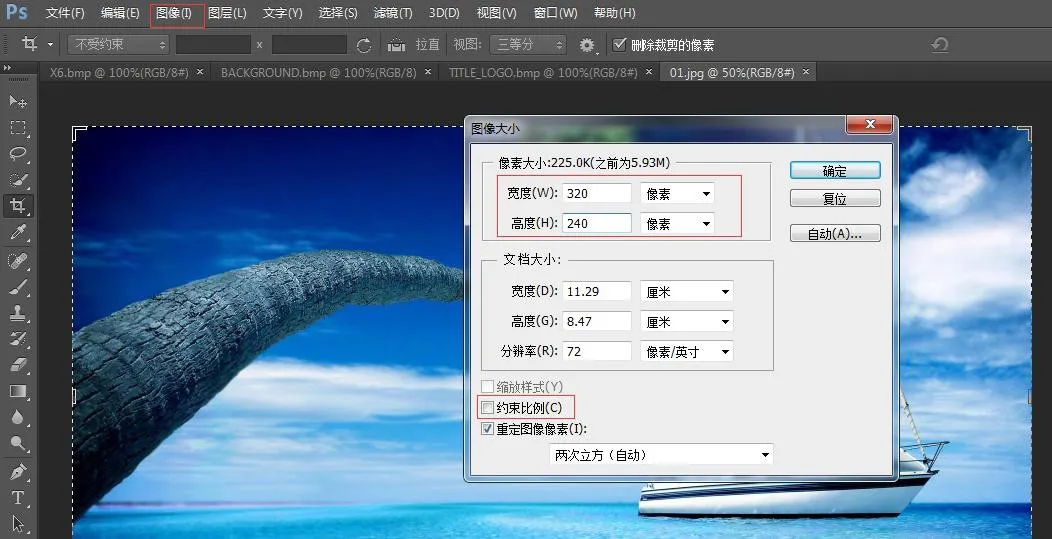 <
Set width and height based on your phone model. Uncheck "Constrain Proportions" → Click OK
<
Set width and height based on your phone model. Uncheck "Constrain Proportions" → Click OK
2.2 File → Save As → Select BMP format
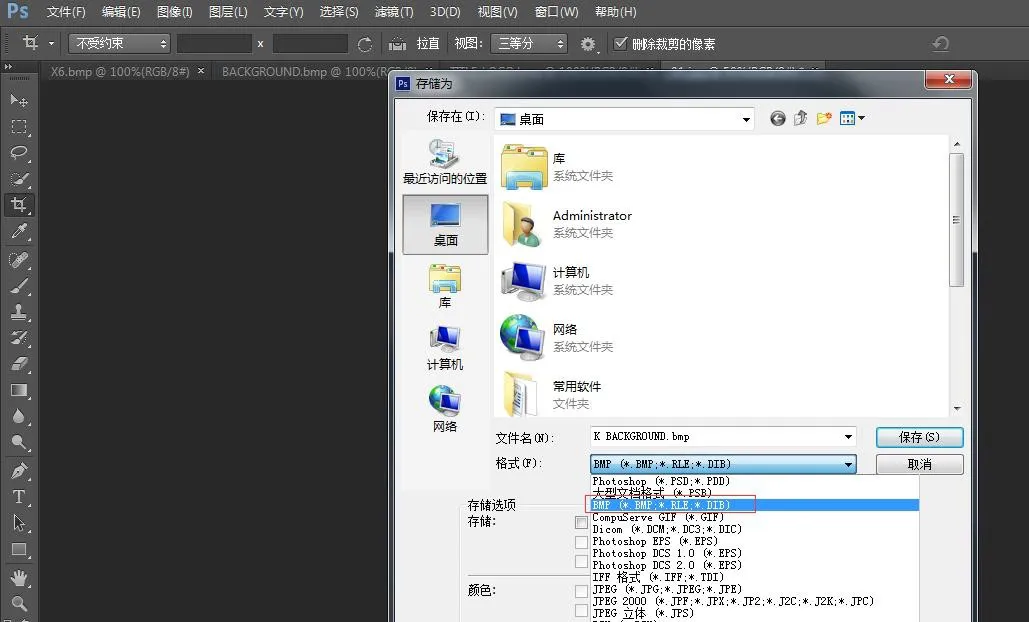
2.3 Click Save, select the correct color depth as shown:
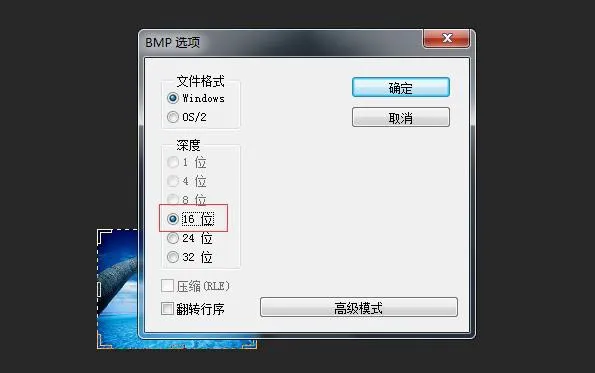 <
Select the matching color depth for your phone model → OK. Image creation complete.
<
Select the matching color depth for your phone model → OK. Image creation complete.
3. Title logo, speed dial and DSS key icons use the same creation method.
4. How to create etc.tar.gz package
Use 7-Zip tool (Example: ICON_SERVICE.bmp)
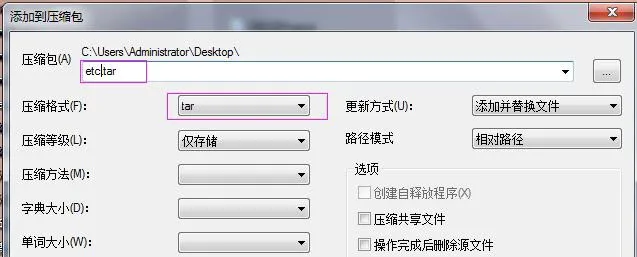
1) Right-click the file → 7-Zip → Add to archive → Archive format: tar → OK → Generate etc.tar
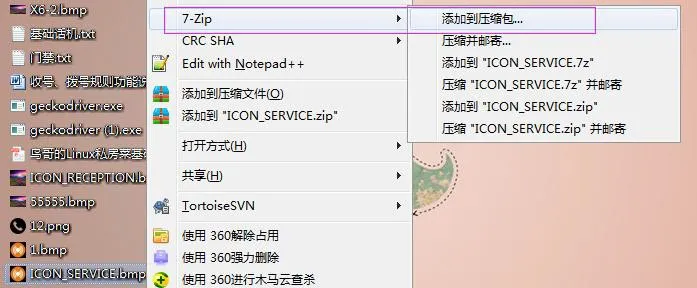
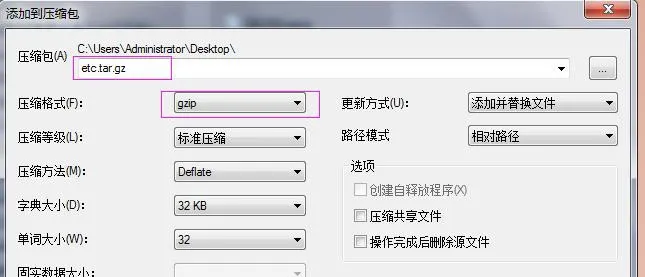
2) Right-click etc.tar → 7-Zip → Add to archive → Archive format: gzip → OK → Generate etc.tar.gz
Phone Upgrade
Web UI Wallpaper Upgrade
BX3S/BX4/BH5 Wallpaper Upgrade
H5 supports wallpaper, title logo and idle speed dial icon upgrade.
Log into phone web UI → Phone Settings → Advanced → Screen Images. Upload .bmp or etc.tar.gz files here.
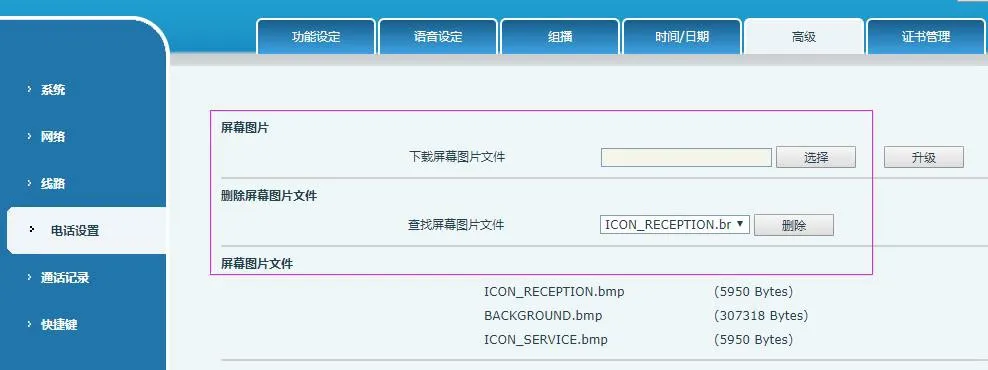 <
After successful upgrade, you can view and delete images on this page.
<
After successful upgrade, you can view and delete images on this page.
BX5S/BX6/BX7/BX7C/GP210/GP210i Wallpaper Upgrade
Log into phone web UI → System → Upgrade → Wallpaper Upgrade
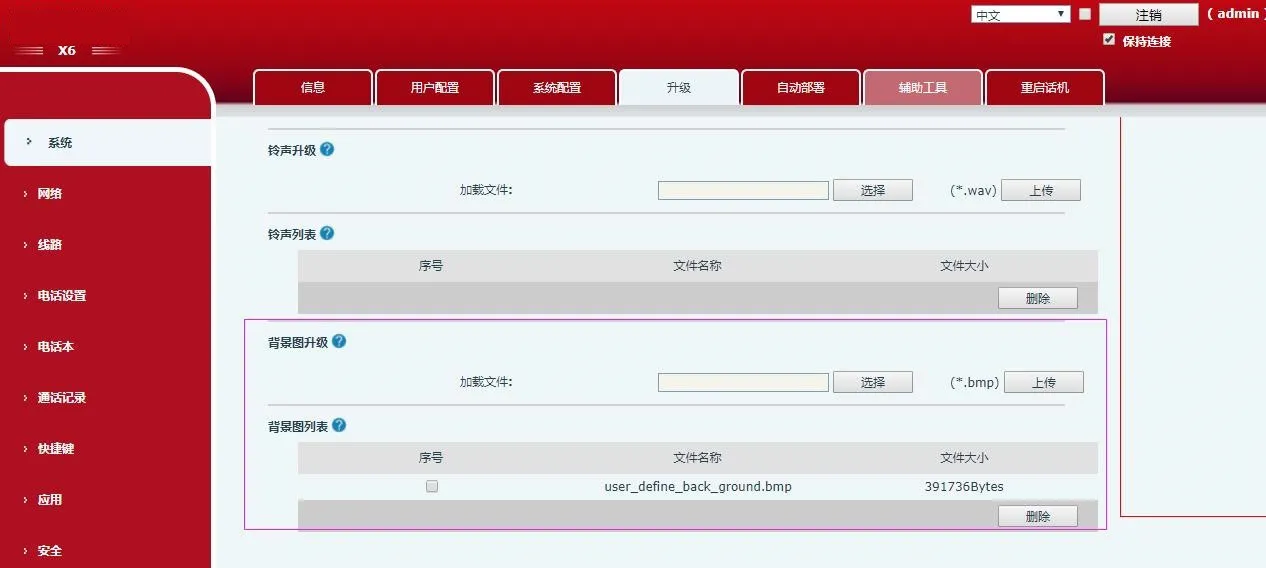 <
After successful upgrade, you can view and delete wallpapers on this page.
<
After successful upgrade, you can view and delete wallpapers on this page.
BX4U/BX5U/BX6U/BX5S/BX6/BX7/BX7C/GP210/GP210i DSS Key Icon Upgrade (2 methods)
1) Direct Upgrade (.png)
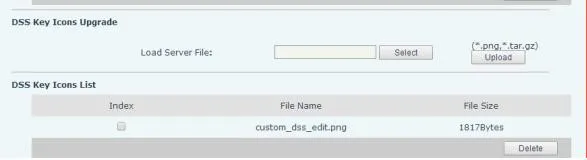
Web UI: System → Upgrade → DSSkey Icons Upgrade. Upload custom icons (must follow Table 4 naming rules). Upgraded icons appear in DSS Key Icons List.
2) Batch Upgrade (.tar.gz)
For bulk icon upgrade, use .tar.gz package (custom name supported).
① Linux packaging command: tar –zcvf etc.tar.gz xxx.png xxx1.png
② Windows packaging (7-Zip):
- Select files → Right-click → 7-Zip → Add to archive → tar → OK (create etc.tar)
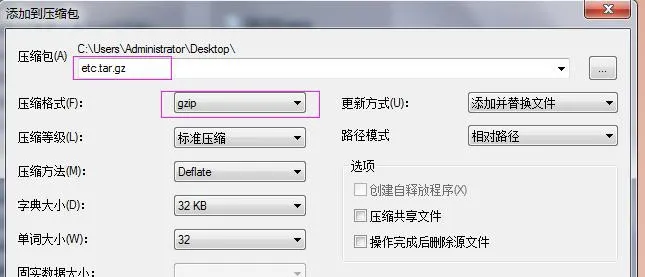
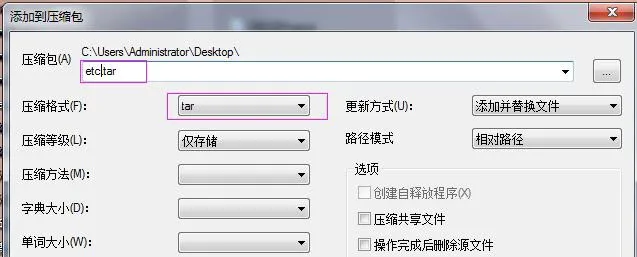 - Right-click etc.tar → 7-Zip → Add to archive → gzip → OK (create etc.tar.gz)
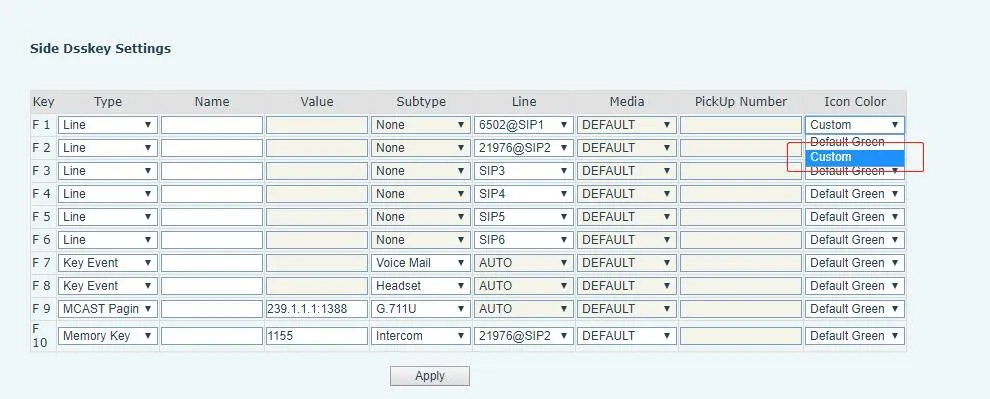
After upgrade, select custom DSS key icons on the web UI.
Auto Provision Upgrade
BX34 Series Auto Provision (Wallpaper, Title Logo; H5 supports speed dial icons)
Add Auto Etc Url in the
| Auto | Etc | Url | : ftp://1:1@172.16.6.62/BACKGROUND.bmp |
| Auto | Etc | Url | : ftp://1:1@172.16.6.62/TITLE_LOGO.bmp |
| Auto | Etc | Url | : ftp://1:1@172.16.6.62/etc.tar.gz |
Configuration example (BACKGROUND.bmp):
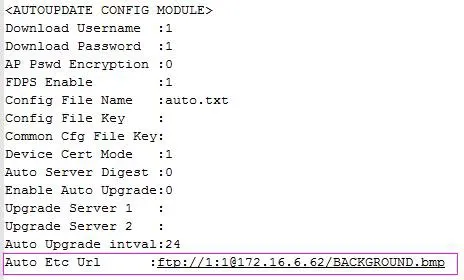
BX4U/BX5U/BX6U/BX5S/BX6/BX7/BX7C/GP210/GP210i use the same Auto Provision method for wallpaper and DSS key icons (no title logo support). File names are customizable.
Example (BX6):
Auto Etc Url : ftp://1:1@172.16.6.62/X6.bmp
Auto Etc Url : ftp://1:1@172.16.6.62/etc.tar.gz