Introduction
Overview
This document describes the Call to Multicast function of the device.
Call to Multicast means that after receiving a call, the device sends remote audio to the multicast network, allowing other devices on the network to receive and play the stream. At the same time, the called device plays the audio through its own speaker.
Applicable Models
All current models sold by the company; EOL products are not included.
How Call to Multicast Works
A normal call occurs between two devices with full-duplex two-way audio.
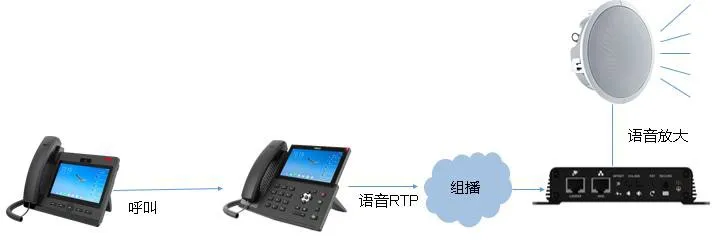
The Call to Multicast function extends this to broadcast applications.
In this function, the caller is typically an IP phone, and the receiver is a broadcast device such as BK-DAB-PA3. After receiving the call and audio, the receiver plays the sound locally and forwards it to a configured multicast address. One or more multicast receivers then play the audio simultaneously.

Figure 1 Normal Call

Figure 2 Call to Multicast
Application Scenarios
Scenario 1: Broadcast Paging
An IP phone calls a BK-DAB-PA3 broadcast device to page an entire group.
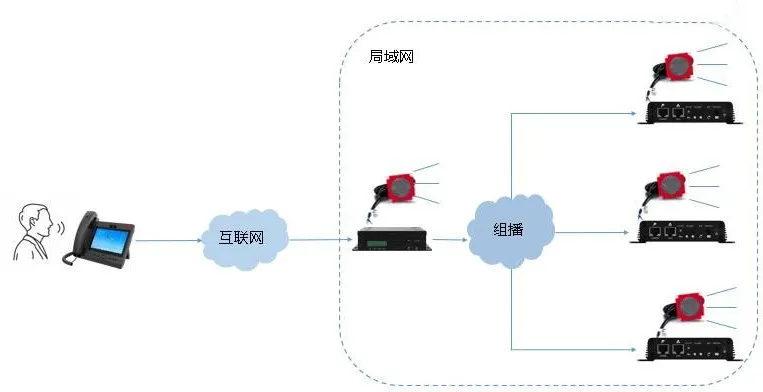
Scenario 2: Audio Amplification
IP phone amplifies received audio.
Note: Avoid howling by balancing volume and distance between sender and receiver.
Prerequisites
- Prepare 2+ broadcast devices connected to a PoE switch with valid network IPs.
- Prepare a configuration PC on the same LAN, able to access the devices.
Wiring Diagram
Connect IP phones and PA broadcast devices to the PoE switch as shown below.

Operation Guide
Before using Call to Multicast, you must configure the devices.
This document uses F600S (caller), PA3 (multicast sender), PA2 / PA2S (multicast receivers) as examples.
Configuration includes:
1. PA3 Multicast Sender Configuration
2. PA2 / PA2S Multicast Receiver Configuration
3. F600S ↔ PA3 call configuration (refer to other FAQs)
PA3 Multicast Sender Configuration
The sender uses the Action Plan feature. It matches the calling number and direction, then executes the multicast action.
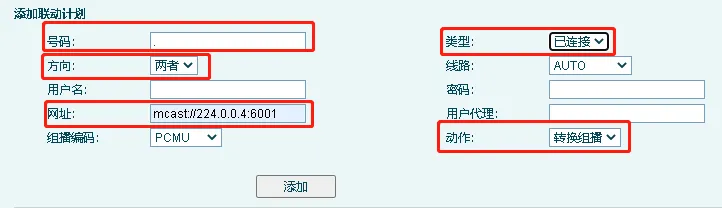
Fields:
- Number: Matches caller ID. Use "." for any number, e.g., "71." matches 71xx. IP prefix like "172.18.8." is also supported.
Note: "." is a dot wildcard.
- Type: Select Connected (start multicast after call answered).
- Direction: Both, Incoming, or Outgoing.
- URL: Multicast address in format: mcast://ip:port
IP range: 224.0.0.0 – 239.255.255.255
Port: 1–65535 (recommend ≥1000)
- Action: Select Convert to Multicast.
Multicast Receiver Configuration
Log into the PA2 / PA2S web interface.
Go to Settings → Multicast.
Enter the same multicast IP and port as the sender.
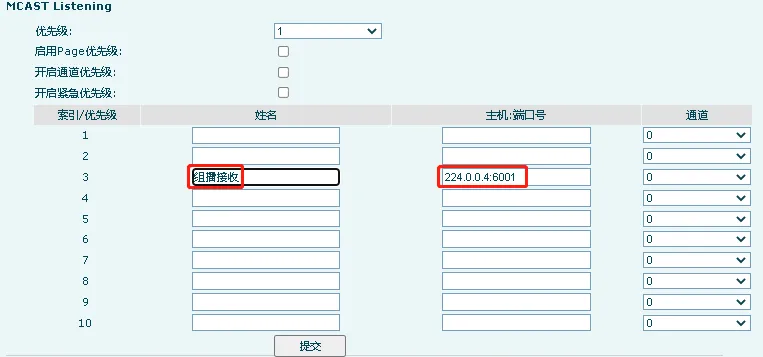
Figure 1 PA2S Multicast Receiver
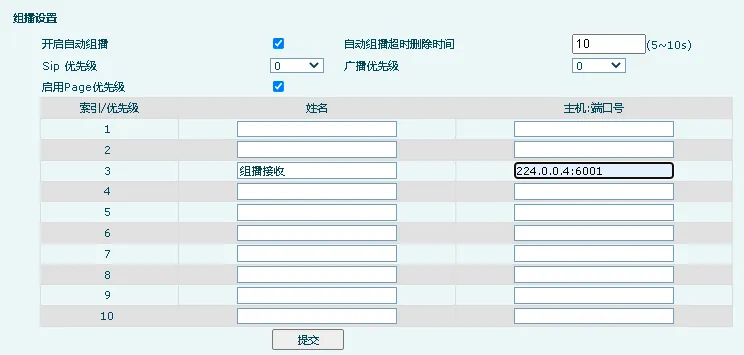
Figure 2 PA2 Multicast Receiver
Fields:
- Index/Priority: Lower number = higher priority (1 = highest). Higher priority can interrupt lower ones.
- Name: Custom name.
- Host:Port: Must match sender exactly.
- Channel: Leave at 0 (only for Polycom compatibility).
Troubleshooting: Call to Multicast Not Working
If the function fails after configuration, check these steps:
- Ensure sender and receivers are on the same LAN. Multicast must NOT be blocked by switches, routers, or VLANs.
- Verify the sender’s Number rule matches the caller’s number. If no match, multicast will not start.