IP PBX System for Business VoIP Communications | Features & Benefits
Learn what an IP PBX system is, how it supports business VoIP communications, its key features, major benefits, deployment options, and why it is replacing traditional PBX systems in modern organizations.
Becke Telcom
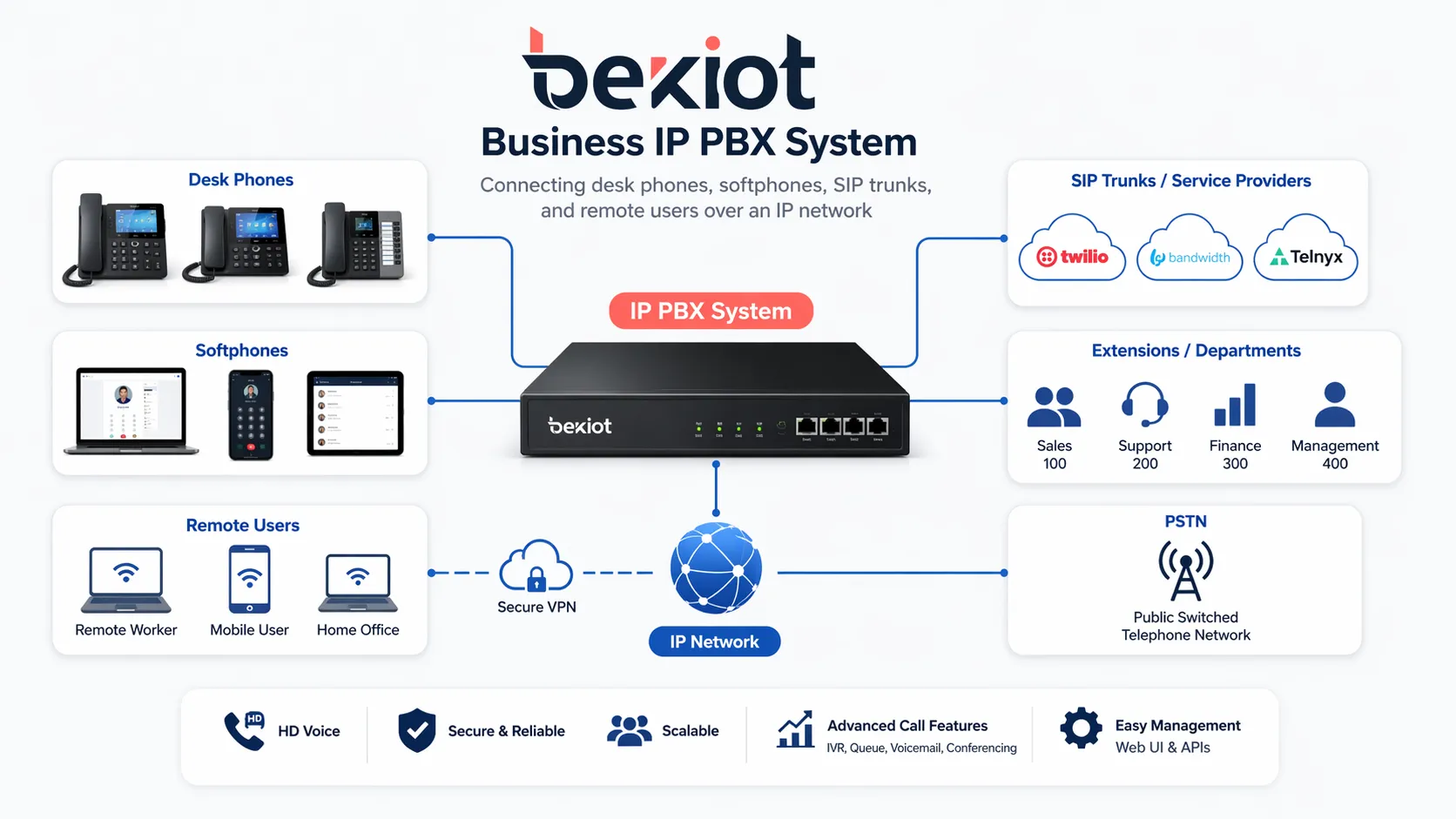
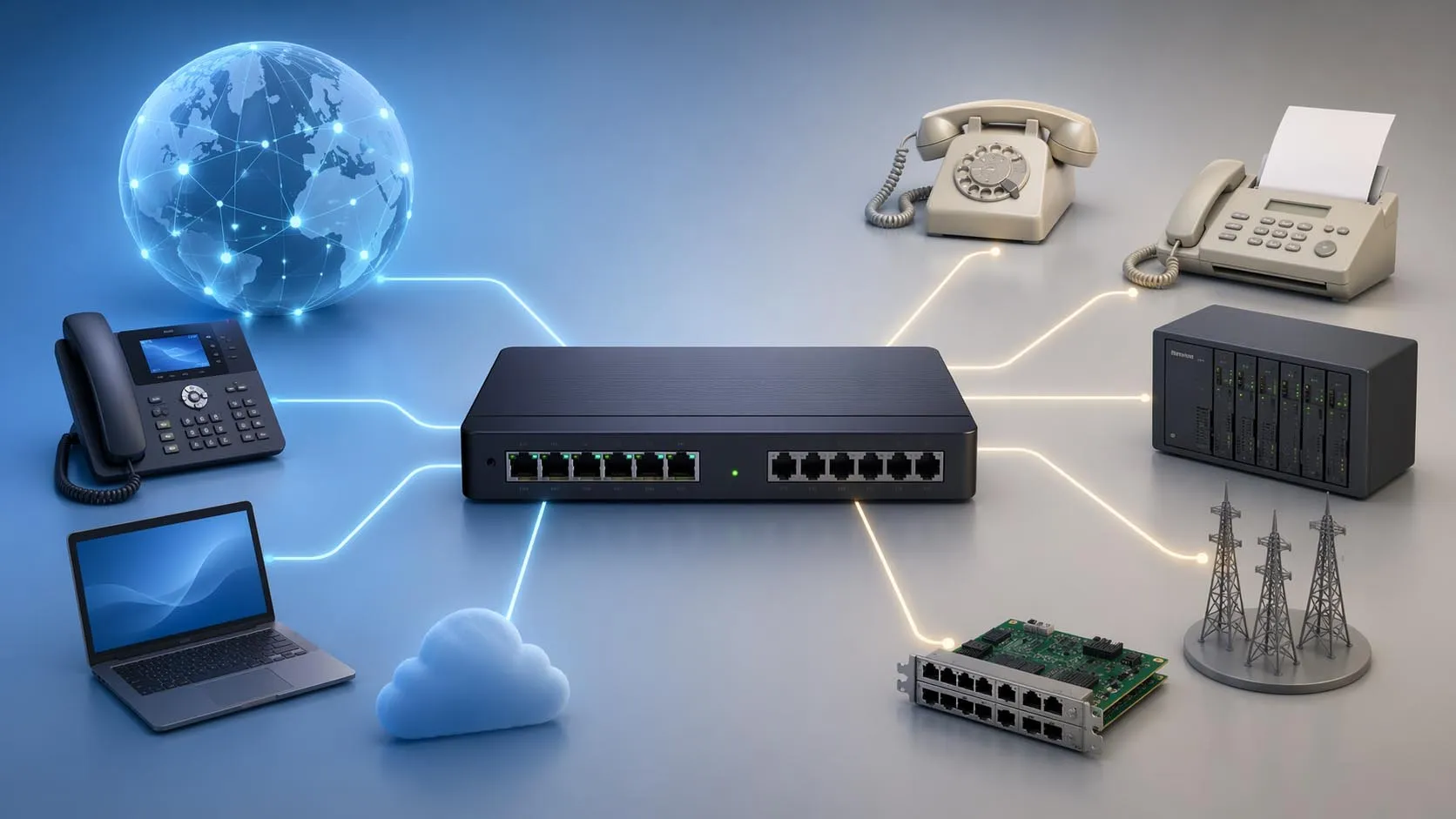
An IP PBX system is a modern business telephone platform that manages voice communications over an IP network rather than relying only on traditional analog or legacy digital lines. It acts as the core control system for extensions, call routing, voicemail, call transfer, conferencing, and other business telephony functions, while also supporting VoIP connectivity through SIP trunks, desk phones, softphones, and mobile clients.
For companies that want more flexible and scalable communications, an IP PBX offers a practical path forward. It can support internal calling, external voice services, remote users, branch offices, and value-added functions from a single architecture. Compared with a traditional PBX, it is usually easier to expand, easier to manage, and better aligned with the way modern businesses communicate across offices, job sites, and remote teams.
IP PBX systems bring desk phones, softphones, SIP trunks, and remote users into one managed business communication platform.
What Is an IP PBX System?
A business phone system built on IP networks
An IP PBX, or Internet Protocol Private Branch Exchange, is the private communication system that handles calls inside an organization and routes calls to outside networks. Instead of depending mainly on conventional copper-based PBX wiring, it uses IP networking to deliver voice services across a local network, a wide area network, or the internet.
In practical terms, this means a company can connect office phones, software clients, video endpoints, paging devices, intercom terminals, and remote users through a unified communications environment. The system can manage extensions, enforce call rules, connect departments, and provide a consistent calling experience across different business locations.
More than a replacement for traditional PBX
Many businesses first look at IP PBX as a lower-cost replacement for an old PBX. While cost savings are important, the real value is broader. An IP PBX can support flexible deployment, centralized administration, multi-site networking, and integration with other communication tools that are difficult or expensive to achieve with legacy infrastructure.
In many environments, an IP PBX also becomes the communication foundation for intercom, paging, conferencing, alarm linkage, or front-desk call handling. That makes it more than a simple phone switch. It becomes a communication platform that can serve daily operations as well as urgent business response needs.
An IP PBX is not only a phone system. For many organizations, it becomes the communication core that connects employees, branches, service teams, and business processes in one manageable platform.
How an IP PBX Supports Business VoIP Communications
Connecting internal and external voice traffic
At the most basic level, an IP PBX handles extension-to-extension calling inside the company and manages incoming and outgoing calls to the public network. Employees can call each other by extension, while external calls can be sent through SIP trunks or other gateways depending on the network design.
This architecture helps businesses move voice traffic away from isolated legacy circuits and onto a more flexible IP framework. As a result, they can simplify branch connectivity, reduce dependence on older infrastructure, and support voice service over the same network environment already used for data and applications.
Extending business communications beyond the office
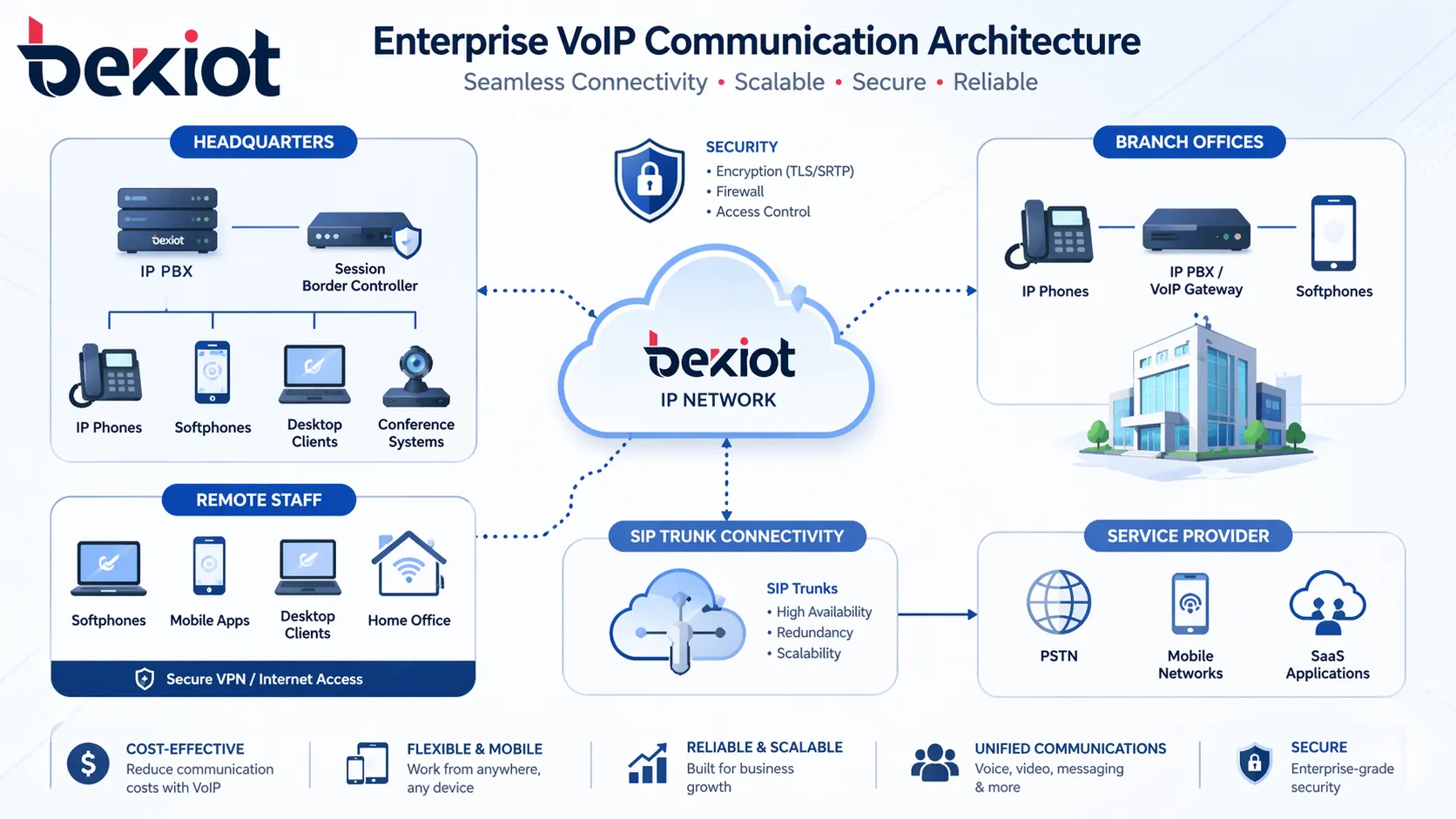
Modern VoIP communications are no longer limited to desk phones on a single floor. Staff may work from branch offices, home offices, service vehicles, warehouses, factories, or field locations. An IP PBX allows those users to remain part of the same communication system through remote extensions, VPN access, softphones, or mobile apps.
This is especially valuable for businesses that need continuity across locations. A user in a branch office, a sales manager on the road, and a support agent at headquarters can all operate within the same dial plan, call policy, and user directory. That consistency improves user experience and makes communications easier to manage at scale.
With IP PBX, headquarters, branches, and remote users can operate under one VoIP communication framework.
Key Features of an IP PBX System
Core telephony and call control features
Most business IP PBX systems include the functions companies expect from a professional telephone platform. These typically include extension management, auto attendant, call transfer, call hold, ring groups, hunt groups, voicemail, call forwarding, and conference calling. These capabilities help organizations route calls more efficiently and reduce the burden on reception and support teams.
They also help standardize communication workflows. Calls can be sent to the right department automatically, overflow calls can be redirected, and missed calls can be captured more reliably. For businesses that depend on fast response and professional call handling, these are not optional extras. They are core operating tools.
Management, mobility, and system visibility
Beyond basic call features, many IP PBX systems provide web-based administration, user provisioning, device management, call logs, permission control, and reporting. These tools make it much easier for IT teams or administrators to configure extensions, apply policies, and maintain visibility across the whole phone environment.
Mobility is another major advantage. A modern IP PBX can support office phones, conference phones, softphones, and mobile clients under one business identity structure. This allows users to stay reachable while moving between desks, buildings, branches, or remote work locations, without abandoning the business phone environment.
Integration with broader communication applications
In more advanced business environments, an IP PBX may also support integration with paging, SIP intercom, video calling, dispatch functions, call recording, alarm notification, or third-party business software. This expands the role of the system from pure telephony into a broader communications hub.
That matters in organizations where voice communication interacts closely with operations. A warehouse may need paging and extension calling. A campus may need intercom and emergency notifications. A service organization may need recording and call queues. The IP PBX provides a flexible foundation that can adapt to these different requirements.
Function
What It Does
Business Value
Extension Management
Creates and controls user extensions across departments and sites
Simplifies internal communications and organization
Auto Attendant / IVR
Routes callers automatically through menu options
Improves caller experience and reduces manual handling
Call Forwarding and Transfer
Sends calls to other users, devices, or departments
Prevents missed calls and improves responsiveness
Voicemail and Recording
Stores missed-call messages and call records
Supports follow-up, compliance, and service quality
Remote Extensions
Connects off-site users to the PBX environment
Supports hybrid work and branch operations
SIP Trunk Connectivity
Links the PBX to external VoIP service providers
Reduces call costs and improves scalability
Why Businesses Are Moving from Traditional PBX to IP PBX
Better scalability and easier expansion
Traditional PBX systems can become costly and restrictive when a company needs to add more users, connect more sites, or introduce new services. Expansion often requires additional hardware, specialized wiring, and vendor-specific configuration. By contrast, an IP PBX is usually much easier to grow because it is built around network-based architecture.
That does not mean every deployment is simple, but it does mean the growth path is usually more flexible. Businesses can add new extensions, integrate new endpoints, connect new offices, or deploy remote users with less friction than they would face in many older PBX environments.
Lower operating pressure and improved flexibility
For many organizations, VoIP-based communication helps reduce recurring telephony costs and makes better use of existing network resources. SIP trunks can often replace or reduce dependence on legacy line services, and centralized management can lower the operational burden of maintaining distributed communication systems.
Flexibility is equally important. A business can change call flows, add departments, relocate users, or support temporary teams without rebuilding the communication system from scratch. In competitive and fast-moving industries, that operational agility is often just as valuable as cost reduction.
Businesses often switch to IP PBX not only to modernize telephony, but to gain a communication system that is easier to scale, easier to manage, and better suited to multi-site and remote work operations.
Common Use Cases for Business IP PBX Systems
Office communications and branch networking
The most common use case is still the modern office environment. Companies use IP PBX systems to connect employees across departments, headquarters, branch offices, and remote teams. Shared extension plans, centralized administration, and consistent call handling make the whole business easier to reach and easier to operate.
This is especially useful for organizations that want professional customer-facing telephony without the limitations of older PBX structures. Sales teams, customer service teams, front desks, managers, and support personnel can all work within the same unified communication environment.
Operational environments that need more than desk calling
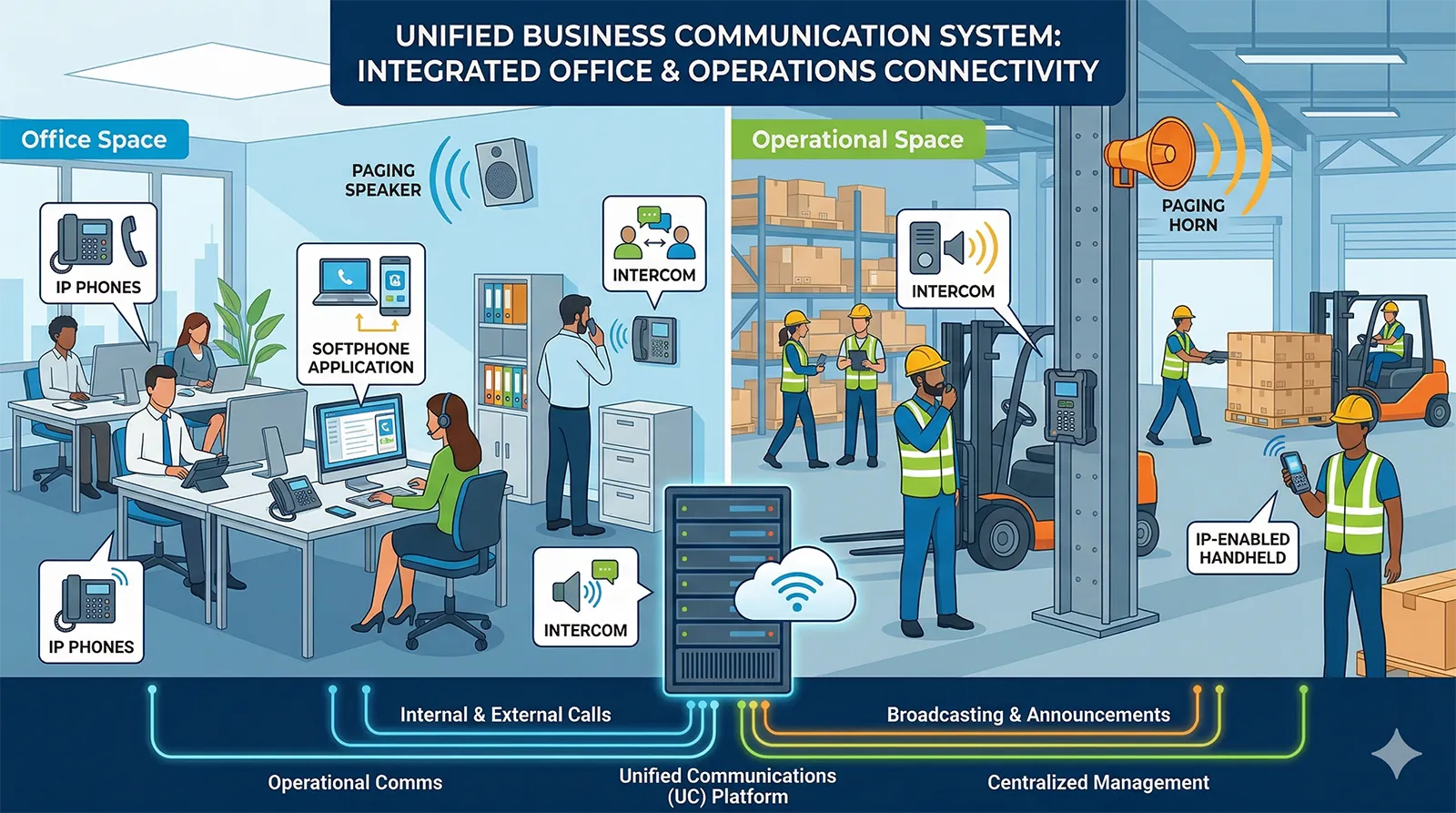
Not every business communication scenario happens at a desk. Warehouses, factories, campuses, hotels, healthcare facilities, and large commercial sites often require a combination of telephony, paging, intercom, notification, and mobile communication. In these cases, an IP PBX can serve as the backbone for multiple voice-related applications.
When designed properly, the system can connect office extensions with operational endpoints, helping staff move between administrative communication and on-site response more efficiently. This makes IP PBX especially attractive for organizations that want a single framework rather than disconnected subsystems.
In many business environments, IP PBX supports not only office telephony, but also paging, intercom, and site-wide communication workflows.
How to Choose the Right IP PBX System
Start with business size, call flow, and deployment needs
The right IP PBX system depends on how your organization actually communicates. A small office may focus on basic calling, mobility, and SIP trunk access. A multi-site company may need centralized management, branch survivability, and unified numbering. A more specialized organization may require paging, intercom, call recording, or integration with other systems.
It is important to think beyond the current number of users. Consider how many extensions you may need in the next few years, how many offices must connect to the system, whether remote users are permanent, and how much control you want over deployment. These factors shape whether an on-premises, hybrid, or hosted approach makes the most sense.
Look at interoperability, security, and long-term value
Compatibility matters. A strong IP PBX should work well with standard SIP endpoints and should fit the devices, trunks, and workflows your business plans to use. If you expect the system to interact with intercom, paging, gateways, video, or other communication components, that interoperability becomes even more important.
Security and reliability should also be part of the decision, especially for organizations that depend heavily on voice communications. Features such as access control, encryption options, role-based administration, and resilient deployment design can make a meaningful difference in day-to-day operation. The best system is not simply the one with the longest feature list. It is the one that supports stable communication and sustainable growth.
Conclusion
An IP PBX system gives businesses a practical way to modernize voice communications and build a more flexible VoIP environment. It supports internal and external calling, remote work, multi-site expansion, and business-grade communication features in a structure that is usually easier to manage than traditional PBX infrastructure.
As business communications continue to evolve, the role of IP PBX remains highly relevant. For organizations that want reliable telephony with room to grow, it offers a strong balance of control, scalability, and integration potential. Whether the goal is replacing a legacy PBX or creating a broader voice communication platform, IP PBX remains one of the most effective options for modern business use.
Talk to Becke Telcom About Your IP PBX Project
If your organization is planning to upgrade business telephony, connect branch offices, support remote users, or build a more integrated VoIP communication environment, Becke Telcom can help you evaluate the right IP PBX architecture for your needs.
From business VoIP calling and SIP trunk connectivity to intercom, paging, and industry-oriented communication integration, Becke Telcom provides practical solutions designed for real operating environments. Contact Becke Telcom to discuss your IP PBX system requirements and explore a solution that fits your business now and as it grows.
FAQ
What is the difference between an IP PBX and a traditional PBX?
A traditional PBX mainly relies on legacy telephone lines and circuit-based switching, while an IP PBX uses IP networks to manage voice traffic. This gives IP PBX more flexibility for expansion, remote access, SIP trunking, and integration with modern communication applications.
Is an IP PBX the same as VoIP?
Not exactly. VoIP refers to voice transmission over IP networks, while an IP PBX is the system that manages business telephony functions such as extensions, call routing, transfers, and policies. In many business environments, the IP PBX is the control platform that enables and organizes VoIP communications.
Can an IP PBX support remote and hybrid employees?
Yes. One of the main benefits of IP PBX is that it can support remote extensions, softphones, mobile clients, and branch users within the same business communication system. This makes it well suited to hybrid work and distributed business operations.
Is IP PBX suitable only for large enterprises?
No. Small and medium-sized businesses also use IP PBX because it can provide professional call handling, scalability, and cost efficiency. The right solution depends more on communication needs, growth plans, and integration requirements than on company size alone.
What should businesses look for when choosing an IP PBX system?
Businesses should look at scalability, SIP compatibility, deployment model, ease of administration, security, remote-user support, and the ability to integrate with other communication tools. A good IP PBX should fit both current operations and future growth plans.
We use cookie to improve your online experience. By continuing to browse this website, you agree to our use of cookie.
Cookies
This Cookie Policy explains how we use cookies and similar technologies when you access or use our website and related services. Please read this Policy together with our Terms and Conditions and Privacy Policy so that you understand how we collect, use, and protect information.
By continuing to access or use our Services, you acknowledge that cookies and similar technologies may be used as described in this Policy, subject to applicable law and your available choices.
Updates to This Cookie Policy
We may revise this Cookie Policy from time to time to reflect changes in legal requirements, technology, or our business practices. When we make updates, the revised version will be posted on this page and will become effective from the date of publication unless otherwise required by law.
Where required, we will provide additional notice or request your consent before applying material changes that affect your rights or choices.
What Are Cookies?
Cookies are small text files placed on your device when you visit a website or interact with certain online content. They help websites recognize your browser or device, remember your preferences, support essential functionality, and improve the overall user experience.
In this Cookie Policy, the term “cookies” also includes similar technologies such as pixels, tags, web beacons, and other tracking tools that perform comparable functions.
Why We Use Cookies
We use cookies to help our website function properly, remember user preferences, enhance website performance, understand how visitors interact with our pages, and support security, analytics, and marketing activities where permitted by law.
We use cookies to keep our website functional, secure, efficient, and more relevant to your browsing experience.
Categories of Cookies We Use
Strictly Necessary Cookies
These cookies are essential for the operation of the website and cannot be disabled in our systems where they are required to provide the service you request. They are typically set in response to actions such as setting privacy preferences, signing in, or submitting forms.
Without these cookies, certain parts of the website may not function correctly.
Functional Cookies
Functional cookies enable enhanced features and personalization, such as remembering your preferences, language settings, or previously selected options. These cookies may be set by us or by third-party providers whose services are integrated into our website.
If you disable these cookies, some services or features may not work as intended.
Performance and Analytics Cookies
These cookies help us understand how visitors use our website by collecting information such as traffic sources, page visits, navigation behavior, and general interaction patterns. In many cases, this information is aggregated and does not directly identify individual users.
We use this information to improve website performance, usability, and content relevance.
Targeting and Advertising Cookies
These cookies may be placed by our advertising or marketing partners to help deliver more relevant ads and measure the effectiveness of campaigns. They may use information about your browsing activity across different websites and services to build a profile of your interests.
These cookies generally do not store directly identifying personal information, but they may identify your browser or device.
First-Party and Third-Party Cookies
Some cookies are set directly by our website and are referred to as first-party cookies. Other cookies are set by third-party services, such as analytics providers, embedded content providers, or advertising partners, and are referred to as third-party cookies.
Third-party providers may use their own cookies in accordance with their own privacy and cookie policies.
Information Collected Through Cookies
Depending on the type of cookie used, the information collected may include browser type, device type, IP address, referring website, pages viewed, time spent on pages, clickstream behavior, and general usage patterns.
This information helps us maintain the website, improve performance, enhance security, and provide a better user experience.
Your Cookie Choices
You can control or disable cookies through your browser settings and, where available, through our cookie consent or preference management tools. Depending on your location, you may also have the right to accept or reject certain categories of cookies, especially those used for analytics, personalization, or advertising purposes.
Please note that blocking or deleting certain cookies may affect the availability, functionality, or performance of some parts of the website.
Restricting cookies may limit certain features and reduce the quality of your experience on the website.
Cookies in Mobile Applications
Where our mobile applications use cookie-like technologies, they are generally limited to those required for core functionality, security, and service delivery. Disabling these essential technologies may affect the normal operation of the application.
We do not use essential mobile application cookies to store unnecessary personal information.
How to Manage Cookies
Most web browsers allow you to manage cookies through browser settings. You can usually choose to block, delete, or receive alerts before cookies are stored. Because browser controls vary, please refer to your browser provider’s support documentation for details on how to manage cookie settings.
Contact Us
If you have any questions about this Cookie Policy or our use of cookies and similar technologies, please contact us at support@becke.cc .